Reverse Engineering Claude Artifacts
What the Network Traffic Shows
I’m building an AI-native product. It’s in stealth, so I won’t name it, but it’s broadly in the AI and SaaS space, and it involves an AI chat interface where the model generates documents alongside the conversation. Reports, plans, analyses. Content that deserves its own panel rather than getting buried in a thread of messages.
That pattern has a name. Claude popularized it: an artifact. The model generates a document, it opens in a side drawer, the conversation continues. If you’ve used Claude.ai, you’ve seen it. If you’re building an AI chat product, you’ve probably wondered how it works.
I needed to implement it. That requires an architectural decision, and before making it I wanted to answer two questions. What’s the natural approach based on how the API works? And is that actually what the best production implementation does?
This article is the account of how I found out.
The first approach: tool calling
The natural instinct when working with modern LLM APIs is tool calling. You define a tool, describe when to use it, and the model decides when to invoke it. For artifact generation, the obvious design is a create_artifact tool with two parameters: a title and the content to display.
The implementation followed a pattern I’d established for the product’s agent system. The tool is defined with a description that guides the model toward using it for appropriate content (standalone documents, reports, structured outputs that benefit from their own view). A transformer maps the raw tool output to a typed card data structure. A custom template renders the card in the chat with a “View” button that opens a modal displaying the markdown content.
Testing immediately surfaced a problem. For content-heavy tools, the LLM streams arguments character by character. A document of several hundred words takes several seconds to stream, and during that time the UI has no signal that anything is happening. The tool call has started, but the frontend doesn’t know it yet. The result is a gap of several seconds where the interface appears frozen.
The solution was to detect the tool name as soon as it appears in the stream, before the arguments have arrived. The Anthropic API makes this possible: the content_block_start event for a tool use includes the tool name immediately, before any input_json_delta events carry the arguments. By detecting this early signal, I could immediately render a “Generating…” card that tells the user something is in progress. I called this a ToolCalledEvent. It’s the streaming equivalent of an optimistic UI update, triggered at the moment the model decides to call a tool.
The result was a working implementation. The model correctly invoked the tool for document-appropriate requests, the card appeared immediately with status feedback, and the modal rendered the content once generation was complete.
There was still a visible gap relative to what I’d seen Claude do. Their artifact appeared with content streaming live into a preview panel. Ours showed a static indicator for several seconds, then a “View” button. Before deciding how to close that gap, I wanted to understand it.
The research question
The first relevant reference I found was a June 2024 blog post by Reid Barber reverse engineering Claude’s artifact feature. His finding: Claude was using inline XML tags in the text stream. The model would emit <antArtifact> markers, and the frontend would intercept these to open the artifact drawer. No tool invocation. Just markup in the text that the client knew how to parse.
That’s a fundamentally different architecture. If it was still current, it would mean reconsidering the tool-calling approach entirely.
The post was from June 2024, approximately 18 months before this investigation. The question was simple: is this still how Claude does it?
The only way to know for certain was to look.
The methodology
The method is straightforward and reproducible by anyone with a browser and a Claude account.
Open a new conversation on claude.ai. Open browser developer tools (F12, or right-click and Inspect) and navigate to the Network tab. Submit a prompt that should trigger artifact generation. The exact prompt used here: “I would like to share a brief 1-pager intro about challenge-based strategy with my team, can you create a markdown artifact?”
In the Network tab, find the SSE (Server-Sent Events) request. On claude.ai, this is the long-lived streaming request that carries the model’s response. Click it, go to the Response or EventStream pane, and read what comes back.
What you get is a sequence of plain-text events, each prefixed with event: and data:. The request payload is visible in the Headers or Payload tab. Both are entirely readable without any special tooling. Nothing is obfuscated.
The findings
XML is gone. Artifacts are now tool-based.
The first thing visible in the request payload is the tools array:
"tools": [
    {"type": "web_search_v0", "name": "web_search"},
    {"type": "artifacts_v0", "name": "artifacts"},
    {"type": "repl_v0", "name": "repl"}
]
The artifacts_v0 tool type is explicitly declared. It’s a first-class tool, listed alongside web search and the REPL. There are no XML tags anywhere in the response stream. The 2024 blog post describes a feature that no longer exists in its original form. Anthropic has fully migrated to a tool-based artifact system.
This was the first thing confirmed: the approach I’d already built was architecturally aligned with where the product had moved.
The two-tool pattern
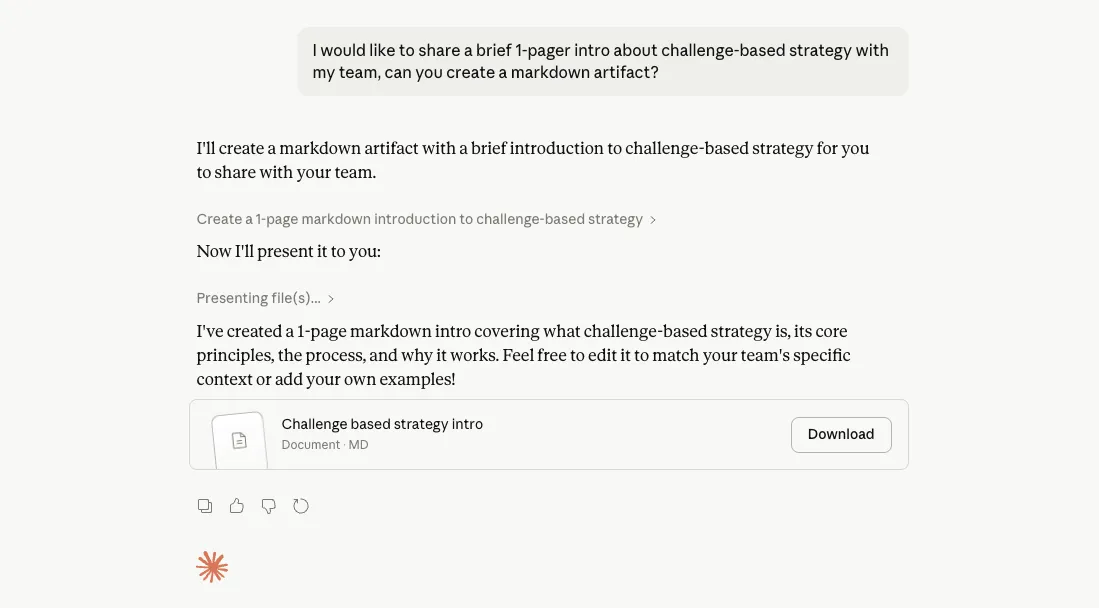
Artifact creation uses two distinct tools in sequence. create_file writes the content to a path in a virtual filesystem. present_files then triggers the UI to open the artifact drawer with that file.
The full response for the test prompt contained 7 content blocks: an opening text block (“I’ll create a markdown artifact…”), the create_file tool use, the create_file tool result, a brief text block (“Now I’ll present it to you:”), the present_files tool use, the present_files tool result, and a closing text block.
The implementation I’d built used a single create_artifact tool that combined both steps. Anthropic’s separation is architecturally cleaner. Content creation and presentation are independent concerns, and keeping them as separate tools means either could theoretically be invoked without the other. It also makes the model’s narration more natural: the text blocks between the two tool calls let the model explain what it’s doing in plain language, which is visible in the screenshot above.
Proprietary metadata events, and what’s actually public
This is the most nuanced finding.
The response stream contains a non-public event type mixed in with the standard content blocks:
{
  "type": "content_block_delta",
  "index": 1,
  "delta": {
    "type": "tool_use_block_update_delta",
    "message": "Create a 1-page markdown introduction to challenge-based strategy",
    "display_content": null
  }
}
The tool_use_block_update_delta type is not in Anthropic’s public API documentation. It carries two fields: message, a human-readable description that appears in the tool card early in the stream, and display_content, which contains the final rendered artifact but is only populated at completion, not during streaming.
Here’s the key observation: the live streaming preview visible in Claude’s expanded tool card, the part that looks like the document typing itself into the panel, does not come from this proprietary event. It comes from the standard input_json_delta events that are part of the public API:
{"type":"content_block_delta","index":1,"delta":{"type":"input_json_delta","partial_json":"# Challenge-Based Strategy: A Brief Introduction\\n\\n## What is Challenge"}}
{"type":"content_block_delta","index":1,"delta":{"type":"input_json_delta","partial_json":"-Based Strategy?\\n\\nChallenge-base"}}
{"type":"content_block_delta","index":1,"delta":{"type":"input_json_delta","partial_json":"d strategy is an approach where"}}
These events are documented and available in any implementation using the Anthropic API. Claude’s UI parses the partial JSON chunks as they arrive and renders the accumulated content into the expanded card in real time. The proprietary tool_use_block_update_delta event handles card metadata. The streaming preview is built on public primitives.
The ToolCalledEvent from my first implementation serves the same purpose as the message field: both provide immediate feedback at the moment the model decides to call a tool, before any arguments have streamed.
The latency is the same
Timestamps from the captured response stream:
| Event | Timestamp | Delta |
|---|---|---|
create_file tool_use start | 10:33:43.258Z | |
create_file tool_use stop | 10:33:47.595Z | +4.34 seconds |
Anthropic’s production system has the same ~4 second latency for content generation that any implementation will have. This is not something a better implementation can eliminate. It is a fundamental property of how LLMs stream tool arguments: the JSON payload is built character by character, and the tool does not execute until the complete argument block has arrived.
The latency is not a bug to fix. It is a constraint to design around.
The UX difference, explained
With the event stream visible, the UX difference becomes precise.
Anthropic’s observed flow: text streams (“I’ll create a markdown artifact…”), the create_file tool card appears immediately in an expanded state with the message from tool_use_block_update_delta, the input_json_delta chunks stream in and the content renders progressively into the expanded card for ~4 seconds, the card auto-collapses on completion, a separate “Now I’ll present it to you:” text block appears, the present_files card triggers the artifact drawer to open.
My implementation’s flow: text streams (if any before the tool call), the tool card appears with “Generating…” status from ToolCalledEvent, no visible content progress for ~4 seconds, the card updates with “View” button, the user clicks to open the modal.
The gap is specifically the expanded streaming preview. Claude’s UI parses the input_json_delta chunks as they arrive and renders them in real time. The ~4 second wait becomes watching the document write itself. Both implementations have identical latency. The experience of that latency is completely different.
And the input_json_delta events that make this possible are already arriving in my implementation’s stream. The gap is not about access to proprietary features. It’s about parsing those chunks and routing them to the card renderer.
What this confirmed, and what comes next
Three things came out of this investigation clearly.
The tool-calling architecture was right. Anthropic’s production system is built on the same fundamental pattern: a tool is invoked, arguments stream, the tool executes, the result renders. The specific design differs (two tools vs. one, a virtual filesystem path vs. modal content), but the architectural foundation is identical. The tool-calling architecture had converged independently with Anthropic’s. That kind of convergence is a reasonable signal that the problem constraints are pointing clearly in one direction.
The latency is a constraint, not a bug. The ~4 seconds are a property of the architecture, shared by every implementation including Anthropic’s own. The right response is designing a UX that makes the wait informative rather than opaque. Their expanded streaming card is the correct answer to this problem.
The path to closing the UX gap is clear: parse the input_json_delta chunks as they arrive and render them progressively into an expanded card. The data is already in the stream. No proprietary access required. That’s the next implementation step, and I’ll write about how it went when it’s done.
What this means for builders
If you’re implementing artifact generation in an AI chat product: tool calling is the architecture. The 2024 XML approach is obsolete. Start there.
Budget for streaming latency in your UX design from the beginning. A static “Generating…” indicator is the minimum acceptable response to the wait. A live content preview is achievable using standard API events and is meaningfully better. Knowing this upfront changes the design conversation.
There is something genuinely rewarding about going to the source. The SSE stream from a web-based AI product is a surprisingly legible record of how that system actually thinks and operates: the sequence of decisions, the event types, the timing, the separation of concerns. Opening the network tab is less a debugging exercise and more an invitation to understand a system from the inside out. Engineers who do this regularly develop better intuitions about what’s actually possible, where the real constraints are, and where the interesting problems live. The gap between what the documentation describes and what a production system actually does is often the most instructive part.
A note on what I observed
This started as a quick verification before making an architecture decision. It turned into a write-up because the findings were more interesting than expected.
The network tab is an underused research tool. For any web-based AI product, what the production system is actually doing is visible in plain text, in your browser, right now.
If you’re building something similar or have thoughts on the findings, I’d enjoy the conversation.